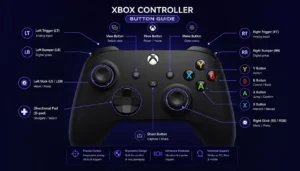
Xbox Controller Test
Connect your Xbox controller and press any button to see live feedback.
Searching for controller…
Press any button to wake it up
Controller Info
Device name—
Index—
Connection—
Mapping—
Buttons
Triggers
Left Trigger (L2)0.00
Right Trigger (R2)0.00
Analog Sticks
Left Stick
X 0.00 Y 0.00
Right Stick
X 0.00 Y 0.00
D-Pad
U
L
R
D
Axis Values
LX0.00
LY0.00
RX0.00
RY0.00
How to Use the Xbox Controller Test?
- Plug the controller in or pair it wirelessly by using the official connection guide then press any A/B/X/Y, LB/RB, View/Menu, or Xbox/Share button to wake the tester page.
- Tap the Xbox/Share button to confirm detection, then Watch the on-screen Xbox layout light up with every press and verify the labels match the real controller.
- Move both thumbsticks and Trace short circles to the edges to Test live values that reveal drift, deadzones and saturation while helping confirm smoth input.
- Run a quick check of vibration and response, then check that inputs, sticks and rumble are responding, ready to play, and export a report for extra peace of mind before you Come back to verify Everything looks good.