
PS5 Controller Tester
Real-time DualSense Gamepad API Tester & Stick Drift Analyzer
Connection Instructions
- Plug in via USB-C cable or pair over Bluetooth.
- Press any button on your controller to activate the browser Gamepad API.
- For Bluetooth Pairing: Hold PS Button + Create (Share) until the lightbar flashes.
How to Test a PS5 Controller on PC
Testing a PS5 controller on a PC works through a browser-based checker that reads live input. Follow these steps:
- Connect the DualSense controller with a USB-C cable, or pair it over Bluetooth. You can follow the official PlayStation guide to connect your device.
- Open the tester and press any button. Most browsers only expose the controller after the first press.
- Check every button to test each one. When the input registers, the matching button highlights on screen.
- Pull each trigger, including L2 and R2, slowly from rest to full travel.
Move both analog sticks, Rotate each in a full circle, then release. Watch the live position to confirm smooth movement, edge coverage, and a clean return to center.
What This PS5 Controller Tester Checks
This page is designed for quick DualSense diagnostics. It helps you confirm whether your browser can detect the controller and whether the core inputs behave as expected.
Testing DualSense Buttons
Check the Dpad, Create, touchpad press, Options, Triangle, Circle, Cross, Square, L3, R3, PS, Mute, L1, L2, R1, and R2.
Need to check only button inputs? Use the Button Tester for a dedicated button diagnostic.
L2 and R2 Analog Trigger Range
Pull L2 and R2 slowly to confirm that both analog triggers report smooth values.Check the range without sticky travel, missing range, or input jumps.
Testing Stick Drift
Move the left and right sticks in circles, diagonals, and short taps.
If a stick moves while untouched, run a deeper stick drift test.
PS5 Controller Vibration Test
Run a basic vibration test to confirm the controller responds to simple browser rumble commands.
For More vibration modes, use the Controller Vibration Test.
PS5 Controller Latency and Response Check
Tap buttons repeatedly and move sticks while watching for missing input.
Look for delayed reactions, connection drops, or obvious input lag.
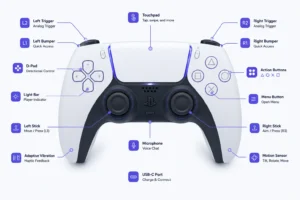
How to Use a DualSense Controller on PC
A DualSense controller connects to a PC through USB-C or Bluetooth. This online test helps you verify the basic input layer before opening Steam, a launcher, a game or a remapping tool.
How Do You Connect a PS5 Controller Using USB-C or Bluetooth?
USB-C gives the cleanest baseline for wired input. Bluetooth lets you pair the controller for wireless play when you need a cable-free connection. The official PlayStation connection guide lists USB and Bluetooth setup steps. Follow these steps to complete the pairing process.
What Can a Browser Test Compared to Steam and PC Games?
This page checks the basic browser input layer only. Steam, drivers and native games expose advanced haptics, adaptive triggers and speaker output. A browser cannot verify these features, which the test limits confirm. The comparison shows the gap between browser input and full driver-level access.