
Xbox Controller Test

Connect your Xbox controller and press any button to see live feedback.

Searching for controller… Press any button to wake it up
Controller Info
Device name
Index
Connection
Mapping
Buttons
Triggers
Left Trigger (L2)0.00
Right Trigger (R2)0.00
Analog Sticks
Left Stick X 0.00 Y 0.00
Right Stick X 0.00 Y 0.00
D-Pad
U
L
R
D
Axis Values
LX
0.00
LY
0.00
RX
0.00
RY
0.00

How to Use the Xbox Controller Test?

  • Plug the controller in or pair it wirelessly by using the official connection guide then press any A/B/X/Y, LB/RB, View/Menu, or Xbox/Share button to wake the tester page.
  • Tap the Xbox/Share button to confirm detection, then Watch the on-screen Xbox layout light up with every press and verify the labels match the real controller.
  • Move both thumbsticks and Trace short circles to the edges to Test live values that reveal drift, deadzones and saturation while helping confirm smoth input.
  • Run a quick check of vibration and response, then check that inputs, sticks and rumble are responding, ready to play, and export a report for extra peace of mind before you Come back to verify Everything looks good.
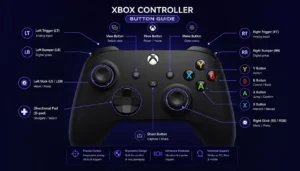
Key Features — Xbox Controller Test

How Does the Real-Time Input Map Work?

Xbox controller test provides instant input mapping with focused on-screen visuals tailored for Xbox layouts. A/B/X/Y, LB/RB, View/Menu, Xbox/Share light up instantly to confirm each input on the layout.If one or more buttons do not register correctly, use the Button Tester for a focused diagnostic.

How Are Triggers and Analog Range Measured?

Pull LT/RT slowly to verify a linear full sweep across the entire trigger travel. The display identifies jumps without smooth progression and provides basic response insights.

How Does the Vibration Check Function?

Xbox controller test includes vibration checks that Run left/right rumble independently. Impulse-trigger pulses are detected when supported, allowing separate feedback verification.

How Is Privacy Protected During Testing?

Device IDs, input logs, and telemetry are uploaded no and stored no, so processing remains inside the browser. This design keeps the lightweight bluetooth test separate from external data storage.

How Does the Thumbstick Path Reveal Stick Issues?

Move the stick to watch a continuous trail with full edge coverage and smooth arcs. The display highlights drift and helps verify micro-adjustments across the complete movement range. If you need more detailed analysis, use the Stick Drift Test or Deadzone Test.

How Does the Bluetooth Stability Check Detect Connection Problems?

Continuous taps visualize jitter and drops during the bluetooth test. Jitter can indicate interference or link issues, allowing quick observation of connection stability.

Xbox Controller Button Names and Layout


xbox controller tester

Scroll to Top